

You can now deploy an OpenLiteSpeed server in xCloud with a single click, right alongside NGINX. Just about a couple of months ago, we released xCloud with the aim of revolutionizing your server and website management experience like never before. Since then, we have been constantly developing xCloud to make it better with additional features and enhancements that you, our valued users, have been asking for.
Today, we have a big announcement about a much-awaited feature – from now on, you can install the OpenLiteSpeed server in xCloud, marking a significant milestone for us.
🎉 Introducing OpenLiteSpeed in xCloud Hosting
At xCloud, you – our valued users – are always in our hearts. We listen attentively to your requests and strive to deliver what you need as quickly as possible. Our recent developments are a testament to this commitment. And this time, we delivered OpenLiteSpeed (OLS) web servers, meeting requests even faster than anticipated!
When we first launched xCloud, a significant number of users expressed interest in having OpenLiteSpeed included in our roadmap.
Responding to the community’s requests, we added OLS to our roadmap for quarter 4, aiming to bring this much-demanded feature before the end of the year. However, OLS quickly became the most requested feature for xCloud, with users inquiring about it almost every day. So, we decided to prioritize the development of OpenLiteSpeed servers – to ensure you get the best possible experience.
Working tirelessly, our team brought OpenLiteSpeed servers for you, as you asked. We extend our heartfelt thanks for your continued trust and support in xCloud Hosting.
📖 Understanding OpenLiteSpeed
Not familiar with the OpenLiteSpeed server? In this section, we are going to give you a brief idea about this outstanding web server.
OpenLiteSpeed (OLS) is the open-source edition of LiteSpeed Web Server Enterprise. It is a high-performance web server software designed to deliver exceptional speed, reliability, and scalability for web applications and websites.
You will get an optimized server performance with enhanced overall user experience thanks to its efficient HTTP request handling and delivering content with minimal latency. It supports a powerful cache engine that will optimize your website performance by a huge margin.
💡 Top Advantages of OpenLiteSpeed
OpenLiteSpeed servers are highly rated for their performance and speed. Since releasing the open source version OLS servers have been widely used by webmasters. Let’s have a quick look at why they prefer OpenLiteSpeed.
Enhanced Website Performance & Speed Optimization
Out of all the benefits it has to offer, OpenLiteSpeed is believed to be the most reliable when it comes to website performance and speed. If you want to build a heavy-duty website, you can trust OpenLiteSpeed for it. They provide the LiteSpeed Cache plugin which has over 5 million active installations and allows users to make your website faster.
Scalability & Flexibility for Diverse Hosting Needs
OpenLiteSpeed (OLS) supports .htaccess files allowing for directory-specific configurations. Thus, it offers both scalability and flexibility. You can scale resources dynamically to accommodate your incoming traffic with ease. Besides, it supports a wide range of Apache functionalities, making it an acceptable replacement for Apache servers in many situations.
An Overview: OpenLiteSpeed Server in xCloud
Now that you have a basic understanding of OpenLiteSpeed servers let’s have a sneak peek at the OpenLiteSpeed functionalities in xCloud.
Available While Deploying Your Server
xCloud has direct integration with some providers, but you can bring any other provider as well to host your site. From now on, you will be able to deploy the OpenLiteSpeed server just like NGINX from our intuitive user interface. With just a single click, you will be able to choose and deploy the OLS server using xCloud without any hassle.
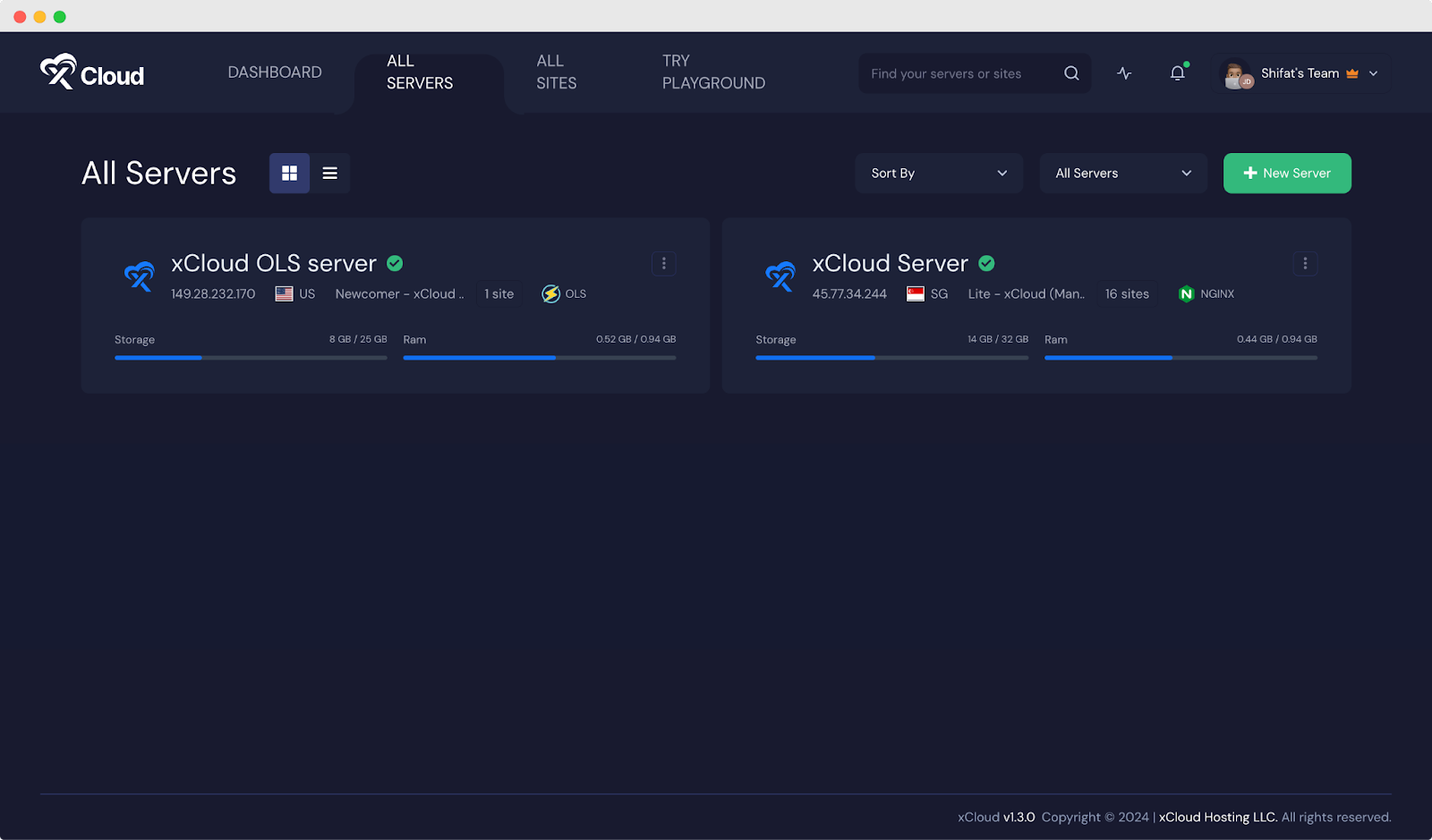
Once your server is ready, you will find it under the ‘All Servers’ tab and manage the server from there.
Access OpenLiteSpeed Server Access & Error Log
With xCloud, you will have the capability to track your server’s complete error log. You can review the failed requests and monitor your access log. Besides, you can clear this log and refresh it if needed.
Enable LiteSpeed Cache (LSCache)
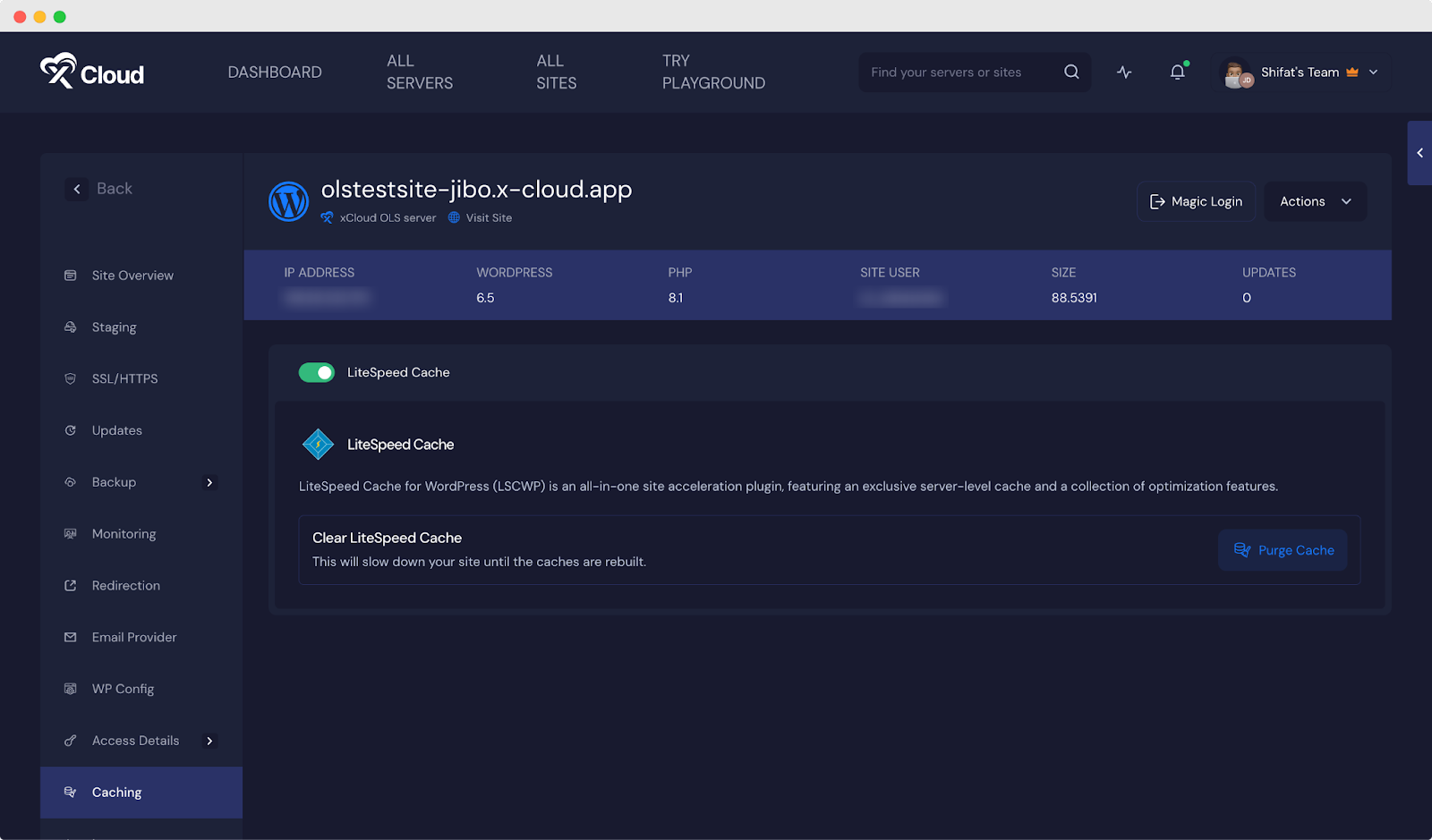
Once you have created a website under your OLS server, now you can enable the LiteSpeed Cache plugin as well. The LiteSpeed Cache module in OpenLiteSpeed is automatically configured in xCloud.
And it works seamlessly with the LiteSpeed Cache plugin to enhance your website performance. This integration ensures an extremely efficient caching solution, optimizing web content delivery and reducing server load for improved user experience.
Update (September 2026): New WordPress sites on xCloud now come with xSpeed Cache installed and switched on instead, marked Recommended during site creation. On OpenLiteSpeed it manages its own server rules, so you get a caching plugin built for OpenLiteSpeed and NGINX servers with page caching, object caching, browser caching, minification and lazy loading in the free plan. See how to configure xSpeed Cache on xCloud for where to find it and how to purge the cache.
Avail 8G Firewall with OLS
With OpenLiteSpeed, we brought the 8G firewall to protect your website from cyber attacks. Your website will be protected from malicious requests, bad bots, automated attacks, spam, and other cyberattacks. You can simply enable 8G Firewall from the settings of your site in xCloud without any hassle. You can also reach the OLS admin panel directly, as shown in how to access OpenLiteSpeed WebAdmin in xCloud.
Guide: How to Migrate to OpenLiteSpeed in xCloud
So, excited about OpenLiteSpeed on xCloud and migrating your servers to OLS servers? Let’s look at the quick tutorials below to migrate to OpenLiteSpeed servers on xCloud.
How to Clone Your Site to xCloud OLS Servers
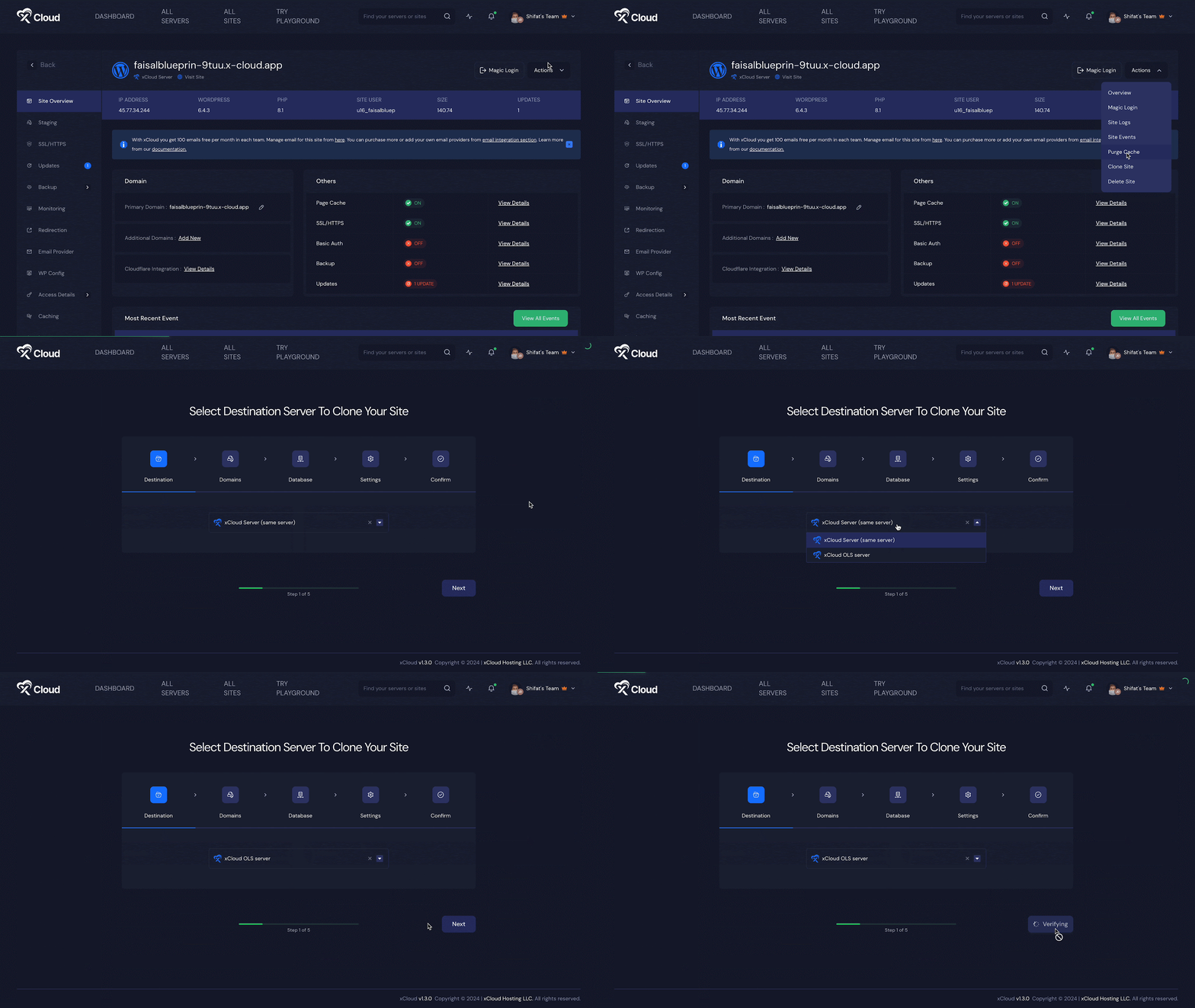
If you want to migrate your website from the existing NGINX server to the OLS servers, go to the specific site first. Afterward, from the ‘Site Overview’ tab, click on the ‘Actions’ and hit the ‘Clone Site’ button. Now, choose the OLS server that you want to use and follow the instructions from this doc.
How to Perform a Full Server Migration to xCloud OLS Servers
If you want to perform a full server migration, go to ‘All Sites’ now hit the ‘Add New Site’ button. Afterward, hit the ‘Full Server Migration’ option. Now, follow this documentation and complete the full migration process.
Experience Enhanced Website Performance with OpenLiteSpeed Servers
We have brought OpenLiteSpeed Server in xCloud to ensure better performance for your website. This feature was much requested, and we put our best efforts into bringing this feature on xCloud as early as possible. So, deploy OLS servers and enhance your website and server management experience. Still deciding between the two web servers? Read our NGINX vs OpenLiteSpeed comparison.
Did you find this blog helpful? If you do, please subscribe to our blog, and don’t forget to join our Facebook Community to engage with our cloud server enthusiasts.
Frequently asked questions
Can I deploy an OpenLiteSpeed server in xCloud?
Yes. When you create a server in xCloud you can choose OpenLiteSpeed instead of NGINX from the same interface. Once it is ready, you manage it from the All Servers tab like any other server.
Which caching plugin should I use on an OpenLiteSpeed site in xCloud?
New WordPress sites on xCloud come with xSpeed Cache installed and switched on, and on OpenLiteSpeed it manages its own server rules. It covers page caching and object caching, so xCloud keeps its own Full Page Caching and Redis Object Caching toggles off for that site to avoid conflicts.
How do I move an existing site from NGINX to OpenLiteSpeed?
Open the site, go to Site Overview, click Actions and choose Clone Site, then pick your OLS server. To move every site on a server at once, use the Full Server Migration option instead.
Last updated September 28, 2026
← All articles